UI Design Overview & Shell
Stravin brings GitHub's familiar developer ergonomics—Pull Requests, Actions Runs, and Repository Settings—into a calm, high-contrast interface styled with Stravin's architectural palette and backed by the vNext platform stack (Core, Review, Run, Index, Gate, Auth, Webhooks, and Notify).
Design Status (vNext UI Specification)
This section specifies the canonical web UI shell, core developer journeys, and visual design language for Stravin's upper layers. Screens are intentionally scoped to high-frequency daily workflows so users can orient immediately without tutorials.
Design Principles
- Familiarity without Clutter: Keep GitHub's proven mental model—top bar, repository tabs (
Code | Pull Requests | Actions | Merge Queue | Settings), conversation/diff review, live workflow logs, and left-rail settings—so any engineer is productive in seconds. - Intuitive First: Every screen has one clear primary action (
New Pull Request,Queue for Merge,Run workflow,Save Changes). Avoid nested menus, multi-step wizards, or cryptic backend jargon on the main canvas. - Progressive Disclosure: Surface power-user capabilities—stacked diffs,
tree_oidverdict reuse, Temporal DAG inspection, speculative Gate batches, and WorkOS/SCIM adapters—as compact inline affordances or collapsible drawers rather than mandatory configuration walls. - Unified Product Accent Language: Subtle 2px tab underlines, status pills, and inline badges use each product layer's canonical accent so users can tell at a glance whether an affordance belongs to Core, Review, Run, Index, or Gate.
Stravin Brand Tokens
Every UI surface uses the canonical tokens defined in stravin-dev/assets/BRANDING.md and docs/assets/stylesheets/extra.css:
| Role | Token Name | Hex | UI Surface Usage |
|---|---|---|---|
| Dark Canvas | Basalt 950 | #0E1116 |
Primary application background, diff canvas, log viewport |
| Dark Surface | Slate 900 | #161B22 |
Top bar, cards, left navigation rails, right metadata rail |
| Dark Hairline | Slate 800 | #252D38 |
Card borders, row dividers, input outlines |
| Light Canvas / Primary Ink | Limestone 50 | #F7F6F2 |
Dark-mode primary text, light-mode canvas |
| Muted Text | Slate 400 | #93A0B0 |
Secondary metadata, timestamps, inactive tabs |
| Brand Highlight | Glacier Mint | #64C5B9 |
Active links, reused tree_oid pills, pass indicators |
| Stravin Core Accent | Strata Teal | #2A9D8F |
Git refs, active branch chips, secondary create buttons |
| Shaded Teal | Abyss Teal | #1C6E66 |
Pressed states, subtle badge fills |
| Stravin Run / Primary CTA | Rivet Terracotta | #E06D53 |
Focal primary CTA (Queue for Merge, Run workflow), live running states |
| Stravin Review Accent | Blueprint Blue | #5B8DEF |
Active Pull Requests tab, stacked diff indicators, OIDC pool badges |
| Stravin Index Accent | Ochre Amber | #D4A34B |
Global search icon, inline symbol hover popovers |
| Stravin Gate Accent | Forged Steel | #7A8B99 |
Merge Queue status badges, policy eligibility indicators |
Typography uses Inter for all UI chrome and prose, and JetBrains Mono for branch refs, commit SHAs, code diffs, step logs, and filter queries.
Full-Width Layout & Responsive Breakpoints
The Stravin web application shell is full width (width: 100%) with zero cramped, fixed-width centered containers. Wide monitors give diffs, Temporal DAGs, and settings tables the entire horizontal canvas, while tablets and phones collapse secondary rails into drawers and sticky action bars with zero horizontal page scroll.
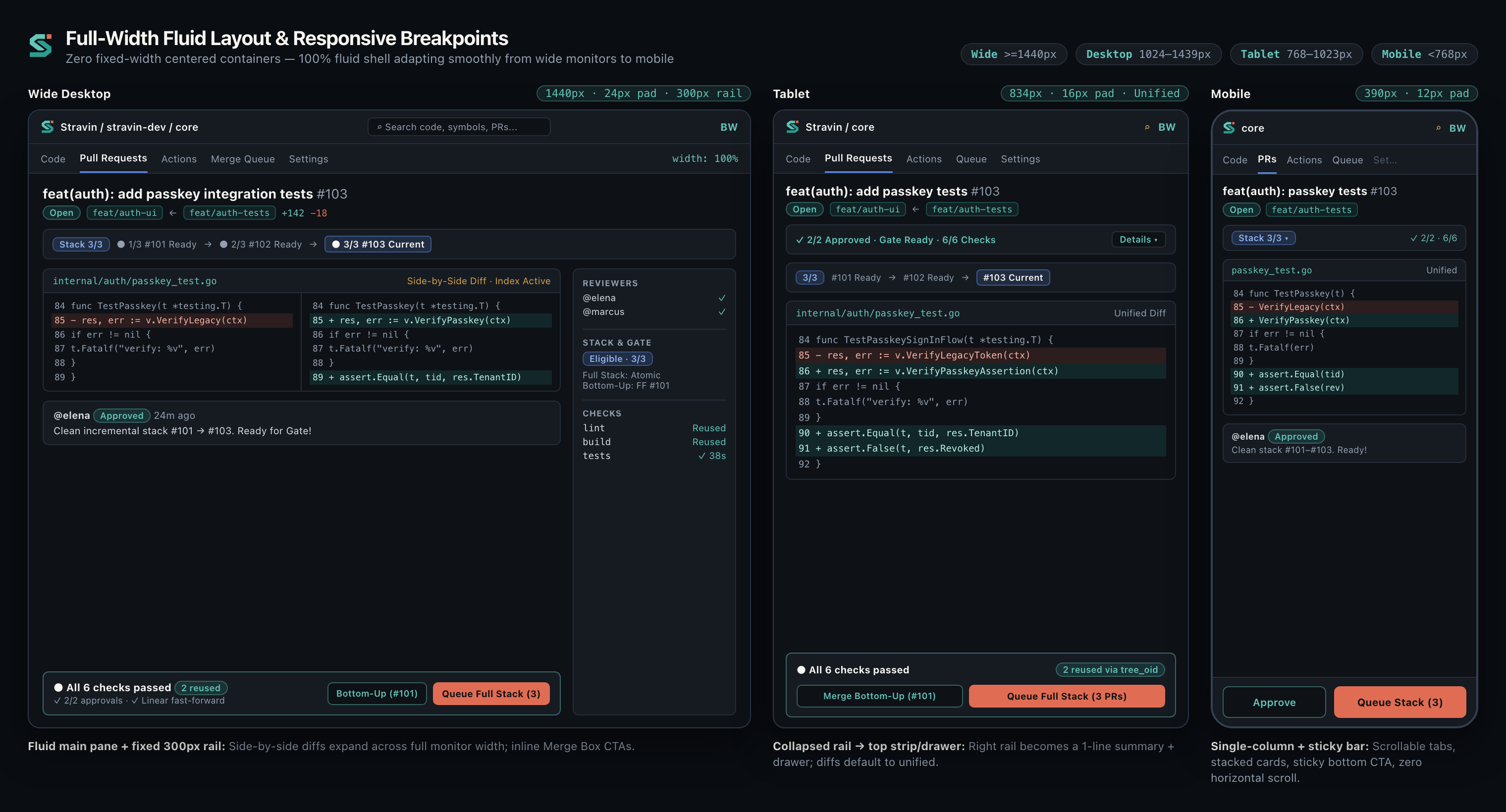
| Breakpoint | Viewport Width | Container & Padding | Rails & Navigation | Diffs, DAGs & Primary Actions |
|---|---|---|---|---|
| Wide Desktop | >= 1440px |
100% fluid (padding-inline: 24px) |
Fluid main pane + fixed 300px right metadata rail (Review / Gate); 240px left workflow/settings rail |
Side-by-side diffs expand to fill all available width; Actions DAG and Settings forms breathe cleanly |
| Desktop | 1024px - 1439px |
100% fluid (padding-inline: 20px) |
Compact 260px right rail; 220px left workflow/settings rail |
Side-by-side diffs stay enabled with compact line-number gutters; DAG nodes stay horizontal |
| Tablet | 768px - 1023px |
100% fluid (padding-inline: 16px) |
Right metadata rail collapses into a compact top summary strip + slide-over drawer; left rails become toggleable drawers | Diffs default to unified view; horizontal DAG scrolls inside its card container |
| Mobile | < 768px |
Single-column 100% (padding-inline: 12px) |
Horizontally scrollable repo tab bar; stacked cards; rails open as full-height bottom/side sheets | Unified diff only; sticky bottom action bar (Approve / Queue) with zero horizontal page scroll |
Rail & Diff Collapse Rules
- Right Metadata Rail (
Review/Gate): Fixed300pxat>= 1440pxand260pxat1024px - 1439px; below1024pxit collapses into a one-line summary strip (approvals, Gate badge, checks) with an expand drawer button. - Left Navigation Rail (
Actions/Settings): Persistent at>= 1024px; below1024pxit converts to a top filter/section selector chip that opens a slide-over drawer. - Diff Viewport (
Files Changed): Defaults to side-by-side at>= 1024pxand switches automatically to unified at< 1024px(user toggleable on Tablet, locked unified on Mobile). - Sticky Mobile Action Bar: Below
768px, primary review and merge actions (Approve,Queue Full Stack/Queue #101) pin to a 56px bottom bar so engineers can act without scrolling back to the Merge Box.
GitHub ⟷ Stravin UX Mapping
| Workflow Area | Kept Familiar from GitHub | Simplified or Upgraded in Stravin |
|---|---|---|
| Repository Navigation | Code, Pull Requests, Actions, Settings top tabs |
Dedicated Merge Queue tab with live count; removes noisy Wiki/Projects/Insights clutter |
| Pull Request Review | Conversation, Commits, Checks, Files Changed tabs + right rail |
Optional single-line Stack Strip for stacked diffs, inline Index symbol hover, and a single Queue for Merge Gate CTA |
| CI / Workflow Runs | Left workflow filter rail + recent runs list + collapsible step logs | Visual Temporal Job DAG above logs, instant tree_oid reused badges, and explicit Hosted vs External OIDC pool tags |
| Branch Protection & Queue | Branch rule form + required status checks | Unified Branches & Gate screen backed synchronously by Core Tier 1 wazero hooks and speculative Gate batches |
| Auth, Webhooks & Alerts | Org/repo left settings rail with focused cards | Standalone-first stravin-auth with optional OIDC/SCIM/WorkOS add-on card, one-click DLQ webhook Redeliver, and quiet-hours stravin-notify toggles |
Global Navigation & Information Architecture
flowchart TD
    Top["Global Top Bar (Stravin Mark · Org/Repo · Index Search · Inbox · Profile)"]
    Top --> Tabs["Repository Tab Bar"]

    Tabs --> Code["Code (Core + Index)"]
    Tabs --> PRs["Pull Requests (Review)"]
    Tabs --> Actions["Actions (Run)"]
    Tabs --> Queue["Merge Queue (Gate)"]
    Tabs --> Settings["Settings (Auth · Gate · Webhooks · Notify)"]

    PRs --> PRList["PR List (Open · Queued · Draft · Stack Filter)"]
    PRList --> PRDetail["PR Detail (Stack Strip · Diff + Index Hover · Gate Merge Box)"]

    Actions --> RunList["Runs List (Workflow Rail · Runner Pools · Quick Re-run)"]
    RunList --> RunDetail["Run Detail (Temporal DAG · tree_oid Reuse · Live Logs)"]

    Settings --> SBranches["Branches & Gate (Wasm Rules · Speculative Batches)"]
    Settings --> SIntegrations["Access & SSO · Webhooks · Notifications"]
Screen Specifications
- Pull Requests (
Stravin Review) — PR list, stacked diff navigation, inlineIndexsymbol hover, and the unified Checks & Gate merge box. - Actions & Workflows (
Stravin Run) — Workflow run list, runner pool visibility (HostedvsExternal OIDC), visual Temporal Job DAG,tree_oidverdict reuse, and live streaming logs. - Settings (
Auth,Gate,Webhooks,Notify,Runners) — Progressive-disclosure configuration for branch protection, Merge Queue batches, standalone vs SSO add-on (stravin-auth), external webhook redelivery (stravin-webhooks), and user notifications (stravin-notify).